Layer Tab
The layer tab is used to configure the overall layer, including its name and properties. These properties are based on the OpenLayers Layer class.
Name: The name of the map layer. This appears in the layer control menu and summary table.
Default Visibility: Choose whether the layer is visible by default when the map loads.
- Layer Properties:
Opacity: Transparency of the layer (0 to 1).
minResolution: Minimum resolution (inclusive) for layer visibility.
maxResolution: Maximum resolution (exclusive) for layer visibility.
minZoom: Minimum zoom level (exclusive) for layer visibility.
maxZoom: Maximum zoom level (inclusive) for layer visibility.
minZoomQuery: Minimum zoom level (inclusive) at which the layer can be queried. If the map is clicked beyond this zoom, it will zoom in to minZoomQuery.
clickTolerance: Pixel tolerance for clicking (and hovering) features. For
ESRI Image and Map Servicelayers this is the server identify tolerance (default10). ForGeoJSONandESRI Feature Servicelayers it widens the on-screen hit area for clicks and hover popups (default0— exact hit). When snapToFeatures is enabled, this value also sets the snap radius (default15). See Feature Snapping and Click Tolerance below.snapToFeatures: Snap the cursor to the nearest feature of this layer while hovering, and select that feature on click. Supported for
ESRI Image and Map Service,GeoJSON, andESRI Feature Servicesources. See Feature Snapping and Click Tolerance below.snapSublayer: For
ESRI Image and Map Servicesnap layers only — the MapServer sublayer used to load snapping features. Defaults to the first id in the source’sLAYERSshow:Nparameter, or0. Set it explicitly when the sublayer you want to snap to differs from that default.
Layer Template: At the bottom of all tabs, you can choose a layer template. This loads a preconfigured layer. Use the dropdown menu to select from available options.
Feature Snapping and Click Tolerance
Clicking exactly on a thin line or a small point is hard — especially on dense datasets like river networks. Two layer properties make features easier to interact with:
Click Tolerance simply widens the clickable (and hoverable) area around every feature by the given number of screen pixels. It is the one setting that governs all pointer interaction with a layer: feature clicks, hover popups, and (when snapping is enabled) the snap radius.
Snap To Features goes further: as the cursor approaches a feature, a highlighted preview traces the feature with a dot marking the exact snapped point, the cursor changes to a pointer, and a click selects that feature directly — no precise aim required. When several features run close together (for example, rivers meeting at a confluence), a click gathers all of the nearby features so the popup can page between them.
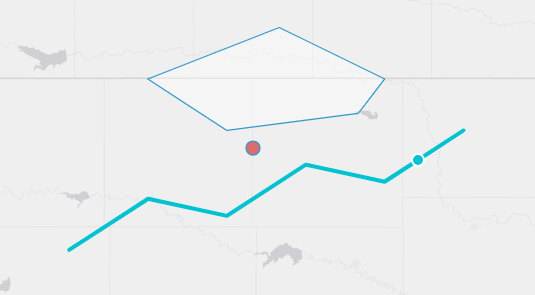
How snapping behaves:
Where the features come from.
GeoJSONandESRI Feature Servicelayers snap against the features already rendered in the browser — what you see is exactly what you can snap to, with no extra network requests.ESRI Image and Map Servicelayers load their features for the current view from the service’s/queryendpoint after each pan or zoom (respecting anyLAYERDEFSfilter, and the sublayer chosen by snapSublayer).Snapping follows visibility. A layer only snaps while it is actually drawn: turning the layer off in the layer control, or moving outside its minZoom / maxZoom / minResolution / maxResolution bounds, disables snapping immediately.
minZoomQuery applies. Like popup queries, snapping is inactive below the layer’s minZoomQuery zoom level.
Radius. The hover snap radius is clickTolerance when set, otherwise
15pixels. The confluence gather radius is at least35pixels and never narrower than the snap radius.Very large services. If an
ESRI Image and Map Servicesnap query is truncated by the server (itsmaxRecordCount), snapping quietly turns off for that view — clicks fall back to the normal identify behavior — and resumes when you zoom in. A single console warning notes the affected service.Polygons snap to their boundary, not their interior. Regular clicks inside a polygon still work as usual.
Example — a GEOGLOWS river layer that is easy to click:
Name:
FlowlinesMin Zoom Query:
12Click Tolerance:
20Snap To Features: checked
Zoomed past level 12, hovering within 20 pixels of a river highlights the nearest reach and a click selects it (updating any connected variable inputs) — even when the cursor is not exactly on the line.